 etl4s
etl4s
-
.lineage(name, inputs, outputs, ...) -
.toDot -
.toMermaid -
.toJson -
.lineageName(name) -
.lineageInputs(inputs*) -
.lineageOutputs(outputs*) -
.withLineage(lineage)
Diagrams
.toDot and .toMermaid render any etl4s pipeline as a diagram, in two modes:
- A single
Nodedraws its structure - leaf names and in/out types, straight from how you composed it. - A
Seqof.lineage-annotated nodes draws the dataflow you declared - datasources, schedules, cross-pipeline dependencies.
Either mode works the same on Reader-wrapped nodes (config-aware, from
.requires) - they carry lineage just like plain Nodes.
Structure of a single pipeline
Any composed pipeline can draw itself - the same view .stages lists. Take the
fan-out / fan-in pipeline with a load step:
import etl4s._

val extract5 = Node(5)
val double   = Node[Int, Int](_ * 2)
val triple   = Node[Int, Int](_ * 3)
val combine  = Node[(Int, Int), Int] { case (a, b) => a + b }
val saveToDb = Node[Int, Unit](n => println(s"saved $n"))

val pipeline =
     extract5 ~> (double & triple) ~> combine ~> saveToDb

pipeline.toDot
Two options:
showTypes = falsedrops the type labels on the edges.directionsets the layout:Direction.LR(default),TB,RL,BT.
See Your First Pipeline for the .stages list
behind the same view.
Lineage of a dataflow
When you want datasources, schedules, and cross-pipeline dependencies, attach lineage
metadata with .lineage, then call .toDot, .toMermaid or .toJson on a Seq of the
annotated nodes.
Quick Start
import etl4s._

val A = Node[String, String](identity)
  .lineage(
    name = "A",
    inputs = List("s1", "s2"),
    outputs = List("s3"),
    schedule = "0 */2 * * *"
  )

val B = Node[String, String](identity)
  .lineage(
    name = "B",
    inputs = List("s3"),
    outputs = List("s4", "s5")
  )
Export to JSON, DOT (Graphviz), or Mermaid:
Visualization
DOT
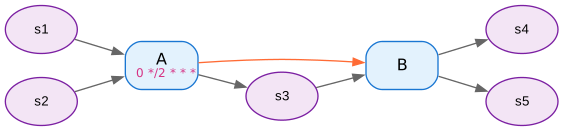
Generate DOT graphs for Graphviz:
Mermaid
graph LR
    classDef pipeline fill:#e1f5fe,stroke:#01579b,stroke-width:2px,color:#000
    classDef dataSource fill:#f3e5f5,stroke:#4a148c,stroke-width:2px,color:#000

    A["A<br/>(0 */2 * * *)"]
    B["B"]
    s1(["s1"])
    s2(["s2"])
    s3(["s3"])
    s4(["s4"])
    s5(["s5"])

    s1 --> A
    s2 --> A
    A --> s3
    s3 --> B
    B --> s4
    B --> s5
    A -.-> B
    linkStyle 6 stroke:#ff6b35,stroke-width:2px

    class A pipeline
    class B pipeline
    class s1 dataSource
    class s2 dataSource
    class s3 dataSource
    class s4 dataSource
    class s5 dataSource
Orange dotted arrows show inferred dependencies.
JSON
The JSON has three top-level keys (all lowercase):
pipelines: array of pipeline objects (with theirinputs,outputs,upstream_pipelines,schedule,description,group,tags,links, ...)datasources: array of data source namesclusters: array of cluster objects
Lineage Parameters
| Parameter | Description | Default |
|---|---|---|
name |
Unique identifier | required |
inputs |
Input data sources | empty |
outputs |
Output data sources | empty |
upstreams |
Explicit dependencies (Node, Reader, or String) |
empty |
schedule |
Human-readable schedule, e.g. 0 */2 * * * |
none |
cluster |
Group name for related pipelines | none |
description |
Free-text description | "" |
group |
Logical grouping label | "" |
tags |
List[String] of arbitrary tags |
empty |
links |
Map[String, String] of label -> URL |
empty |
.lineage(...) works the same on a Reader[T, Node] (config-aware node) as it
does on a plain Node.
Low-level setters
For attaching metadata incrementally there are also individual setters:
.lineageName(name), .lineageInputs(inputs*), .lineageOutputs(outputs*), and
.withLineage(lineage) (attach a fully-built Lineage). These are available on
both Node and Reader.
Unlike .toDot / .toMermaid (which dispatch on single-node structure vs. Seq
dataflow, as described at the top), .toJson always emits the lineage metadata -
on a single node or a Seq.
Explicit Upstreams
Use upstreams for non-data dependencies:
If you add a node C
Then do:
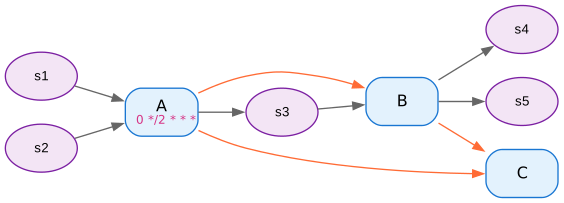
Note how C has an orange upstream dependency to A and B despite not having as inputs their outputs.
Clusters
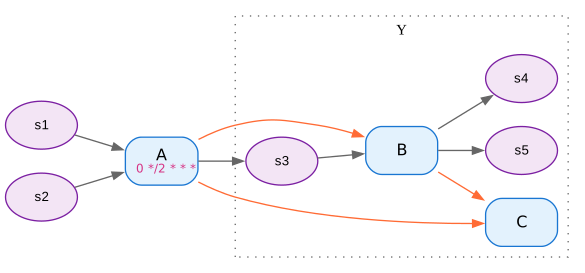
Group related pipelines:
val B = Node[String, String](identity)
  .lineage(
    name = "B",
    inputs = List("s3"),
    outputs = List("s4", "s5"),
    cluster = "Y"
  )

val C = Node[String, String](identity)
  .lineage(
    name = "C",
    upstreams = List(A, B),
    cluster = "Y"
  )

Seq(A, B, C).toDot