Lineage
Attach lineage metadata with .lineage then use .toDot, .toMermaid or .toJson to
get the string representation of your lineage diagrams.
Quick Start
import etl4s._

val A = Node[String, String](identity)
  .lineage(
    name = "A",
    inputs = List("s1", "s2"),
    outputs = List("s3"),
    schedule = "0 */2 * * *"
  )

val B = Node[String, String](identity)
  .lineage(
    name = "B",
    inputs = List("s3"),
    outputs = List("s4", "s5")
  )
Export to JSON, DOT (Graphviz), or Mermaid:
Visualization
DOT
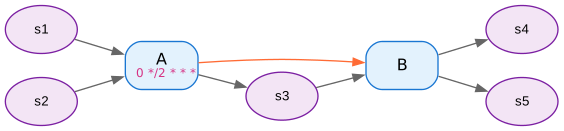
Generate DOT graphs for Graphviz:
Mermaid
graph LR
    classDef pipeline fill:#e1f5fe,stroke:#01579b,stroke-width:2px,color:#000
    classDef dataSource fill:#f3e5f5,stroke:#4a148c,stroke-width:2px,color:#000

    A["A<br/>(0 */2 * * *)"]
    B["B"]
    s1(["s1"])
    s2(["s2"])
    s3(["s3"])
    s4(["s4"])
    s5(["s5"])

    s1 --> A
    s2 --> A
    A --> s3
    s3 --> B
    B --> s4
    B --> s5
    A -.-> B
    linkStyle 6 stroke:#ff6b35,stroke-width:2px

    class A pipeline
    class B pipeline
    class s1 dataSource
    class s2 dataSource
    class s3 dataSource
    class s4 dataSource
    class s5 dataSource
Orange dotted arrows show inferred dependencies.
JSON
JSON structure includes:
- pipelines: Array of pipeline objects
- dataSources: Array of data source names
- edges: Connections with isDependency flag
Lineage Parameters
name(required): Unique identifierinputs: Input data sources (default: empty)outputs: Output data sources (default: empty)upstreams: Explicit dependencies (Nodes, Readers, or Strings)schedule: Human-readable schedule (e.g., "0 /2 * * ")cluster: Group name for organizing related pipelines
Explicit Upstreams
Use upstreams for non-data dependencies:
If you add a node C
Then do:
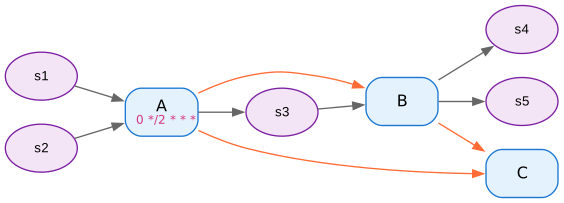
Note how C has an orange upstream dependency to A and B despite not having as inputs their outputs.
Clusters
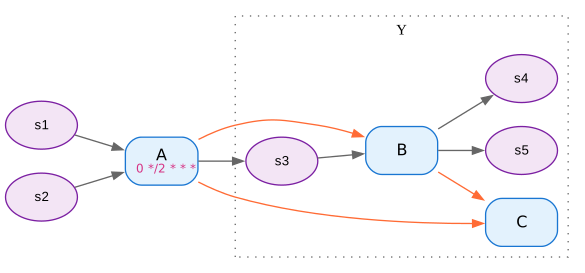
Group related pipelines:
val B = Node[String, String](identity)
  .lineage(
    name = "B",
    inputs = List("s3"),
    outputs = List("s4", "s5"),
    cluster = "Y"
  )

val C = Node[String, String](identity)
  .lineage(
    name = "C",
    upstreams = List(A, B),
    cluster = "Y"
  )

Seq(A, B, C).toDot